
Make cloud services secure, accessible and resilient
Cloud services now underpin many of the systems schools and trusts rely on day to day. The challenge is keeping everything joined up: which systems are cloud based, what data they hold, how access is controlled, what happens if a service is unavailable, and how backup and recovery is tested and evidenced.
The DfE cloud solution standard sets expectations for selecting cloud services, managing identity and access, protecting data, ensuring availability across devices, and putting appropriate backup and recovery in place. Computeam Compass gives you a clear way to understand how your cloud approach compares to the digital and technology standard, assign actions, and maintain a record of decisions, risks and improvements.
49% of IT leads cite migration costs as a barrier to further cloud implementation.
Source: Technology in schools survey: 2024 to 2025 – Research report (Department for Education, carried out by IFF Research, published Nov 2025)
The key cloud checks you need in place
The DfE cloud solution standard sets out what schools and colleges should have in place when using or moving to cloud services. It covers how you choose cloud solutions, how you protect data, how you manage user access, how you ensure availability and how you handle backup and recovery.
The guidance identifies five core expectations: using cloud as an alternative to locally hosted systems, complying with data protection law, using identity and access management tools, ensuring solutions are available on a range of devices and putting appropriate data backup in place. It also stresses the importance of strong broadband and internal networks so that cloud services can perform reliably in daily use.
At a glance, this digital and technology standard covers:

Using cloud solutions as an alternative to locally hosted systems, including servers
Making sure cloud solutions comply with data protection legislation and guidance
Using identity and access management tools to control logins and permissions
Ensuring cloud services are available when needed on a range of devices
Putting appropriate data backup and recovery arrangements in place
Reduce risk and improve resilience for cloud-based systems
Cloud solutions now underpin many of the systems schools rely on, from email and virtual learning environments to safeguarding tools and finance platforms. When cloud is planned well, staff can access information securely from any location, updates are handled by the provider and local infrastructure is simpler to manage. Poorly planned cloud adoption can have the opposite effect, creating confusion about logins, gaps in data protection and uncertainty over where information is stored.
Data protection is a central concern. Cloud services routinely handle personal and sensitive information relating to pupils, staff and families. The DfE digital and technology standard expects schools to apply data protection legislation to their cloud choices, including the use of data protection impact assessments where appropriate, clear data sharing agreements and a documented approach to retention and deletion.
If key systems are hosted in the cloud, broadband and internal networks must be capable and reliable. Staff need confidence that cloud platforms will be accessible in lessons, during busy office hours and at key points in the year, such as exam periods or census windows. For multi-academy trusts, coherent cloud choices make it easier to standardise processes, share data appropriately and support staff who work across schools.
How Compass helps you manage cloud standards with confidence
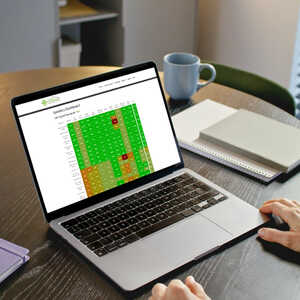
Computeam Compass turns the DfE cloud solution standard into a clear framework that leaders and technical teams can work on together. It helps you build a structured understanding of your cloud estate and its alignment with DfE expectations.
Make the expectations visible
Compass presents the key cloud requirements in a structured format that follows the DfE guidance. Schools can record which systems are in the cloud, what data they hold, what legal and technical controls are in place and how availability and backup are managed. This gives SLT, IT staff, DPOs and governors a shared view of cloud use across the school or trust.
Assign ownership and track actions
When gaps are identified – for example, missing data processing agreements, limited backup testing or fragmented login arrangements – Compass allows you to create actions with named owners and target dates. Tasks might include completing a data protection impact assessment, consolidating identities into a single access management system or reviewing backup options with suppliers. Progress is visible to the relevant teams, which supports timely follow-up.
Keep a secure, auditable record
Compass provides a secure place to store cloud-related evidence and decisions. You can log copies or references for contracts, data protection documentation, risk assessments, backup test results, and review notes against the relevant digital and technology standard. Each update is time-stamped, which helps you demonstrate how your cloud approach has developed over time and how you respond to changes in risk.
Give MAT leaders a trust-wide view
For multi-academy trusts, Compass consolidates cloud information from multiple schools. Central teams can see which systems are used where, how consistently data protection and backup expectations are met and where support may be needed to move away from ageing local infrastructure. That insight makes it easier to coordinate cloud strategies, negotiate contracts and plan training.
Your next steps
If you are reviewing your cloud solutions against the DfE digital and technology standard, Computeam Compass can provide structure and shared visibility. It helps you capture what is in place now, identify where cloud systems need further work and record the actions you are taking to improve security, compliance and resilience.

See how Compass tracks the cloud solution standard alongside the wider DfE digital and technology framework.

Explore Compass with your team and begin building a live picture of your school or trust’s digital and technology standards.
Get in touch
See where you stand - and what to do next
Computeam Compass is now available for Computeam clients – and can be explored by any other MAT or School looking to adopt a clearer, more strategic approach to digital compliance.
Share a few details and we’ll send you a demo login and the quickest way to get started. You’ll get a clear view of where you stand, what to prioritise, and who needs to own each action.
 Updating page...