Select Your Cookie Preferences

We use cookies and similar tools that are necessary to enable you to use our website, to enhance your experience, and provide our services, as detailed in our Cookie Notice. We also use these cookies to understand how customers use our services (for example, by measuring site visits) so we can make improvements.

With your consent, we and our partners may use personal data (like browsing behaviour or unique IDs) for ads personalisation, content measurement, and audience insights. Click "Customise Cookies" if you'd prefer to decline these cookies, make more detailed choices, or learn more. Learn how Google uses your data

Customise Cookies

Computeam Compass

Get a clear view of your DfE Digital and Technology Standards - in one place

Compass helps schools and MATs turn DfE guidance into clear actions, shared ownership and an audit-ready evidence trial.

Make digital standards manageable.
Start your free Compass trial

Share a few details and we’ll send you a demo login and the quickest way to get started. You’ll get a clear view of where you stand, what to prioritise, and who needs to own each action.

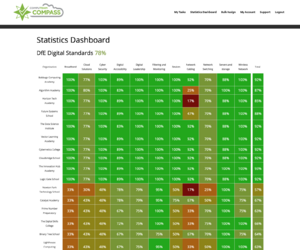
View progress at a glance

Collaborate to complete actions across your team

Fully auditable for compliance

Align with latest DfE guidance

Reduce admin and plan your next steps
Not sure where you stand on DfE Digital and Technology Standards?

Start here.

Computeam Compass is a simple, intuitive dashboard for schools and trusts working towards the Department for Education’s digital and technology standards. Most UK schools are aware of the digital and technology standards, but the vast majority have no clear plan on how to meet them or evidence progress.

Sound like you? You’re not the only school trying to make sense of this. The DfE’s digital and technology standards are becoming more important - but the same challenges come up again and again: time, budget, and collaborative ownership.

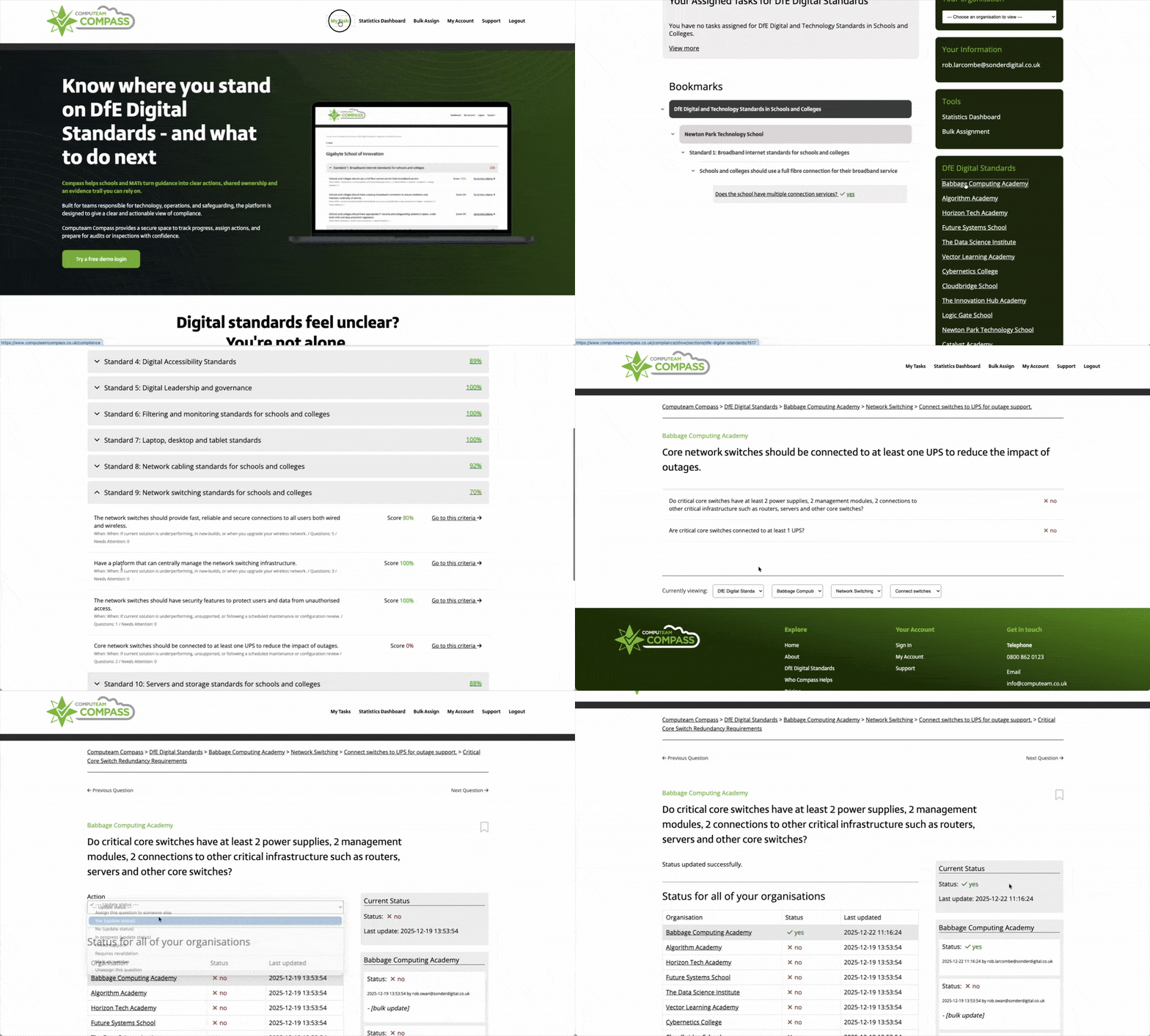
Computeam Compass provides a secure, collaborative platform for managing that journey, turning the DfE digital and technology standards into clear criteria, owned actions and a live evidence base that school and trust teams can work on together.
Request Your Free Demo Login to Compass

The DfE expects progress towards the core standards by 2030

The DfE has set the ambition for every school to be working towards meeting the six core digital and technology standards by 2030. If you’re not sure where you stand, you’re not alone - the important thing is getting organised now, one manageable step at a time.

Build an audit-ready picture of your digital standards

Most schools already engage with the DfE digital and technology standards in some way – through safeguarding reviews, IT upgrades, cyber security work or trust level projects. The risk is that this activity becomes fragmented. Different teams hold different pieces of the picture in emails, spreadsheets and individual knowledge.

A dedicated DfE digital and technology standards Hub for Compass brings that work together. It helps you:

See your position against each DfE standard in one place

Prioritise actions based on risk, impact and upcoming renewals

Assign clear responsibilities across SLT, IT, DSL, DPO and business staff

Maintain an audit trail of reviews, decisions and improvements

Give governors, trustees and MAT leaders simple, accurate oversight

A simple dashboard for
DfE Digital & Technology Standards

Compass is designed specifically for schools, colleges and multi-academy trusts. Across all the digital and technology standards, it helps you:

1

Turn DfE guidance into practical checklists and criteria that non-technical leaders can understand

2

Capture what is already in place, from infrastructure and contracts to policies and training

3

Create and track actions with named owners and timelines

4

Store evidence, notes and key documents securely against each digital and technology standard

5

View progress across multiple schools from a MAT-level dashboard

Compass supports compliance work and inspection readiness by improving visibility and documentation. It does not replace professional advice or guarantee specific inspection outcomes.


The Core DfE Digital and
Technology Standards 

Compass turns every digital and technology standard into plain-English questions, assignable actions and an evidence trail.

Broadband internet standards

Full fibre broadband, appropriate speeds and resilient connections are now core expectations. The broadband standard sets out what primary and secondary schools should have in place for connection type, performance, backup and safeguarding controls.

Broadband internet standard

Wireless network standards

Wireless access has to be reliable, secure and available wherever teaching and administration take place. The wireless standard covers modern Wi-Fi versions, access point design, central management and wireless security.

Wireless network standard

Network switching standards

Switches are the backbone of your network. The switching standard focuses on performance, central management, security features and resilience so that wired and wireless traffic can flow safely and reliably.

Network switching standard

Network cabling standards

High-quality cabling underpins everything else. The cabling standard sets expectations for copper and fibre specifications, installation practice, safety, documentation and warranties.

Network cabling standard

Servers and storage standards

Many schools still run local servers and storage alongside cloud services. The servers and storage standard explains what’s expected in terms of resilience, backup, security, physical environment and lifecycle management.

Servers and storage standard

Cloud solution standards

Cloud platforms now handle email, learning, safeguarding and administration in many settings. The cloud standard covers data protection, identity and access management, availability and backup for cloud-based systems.

Cloud solution standard

Cyber security standards

Cyber incidents can disrupt teaching, compromise data and create significant cost. The cyber security standards focus on governance, risk assessment, technical controls and response planning, with clear expectations for annual and termly review.

Cyber security standards

Filtering and monitoring standards

Filtering and monitoring are central to online safety and Keeping Children Safe in Education statutory guidance. This standard explains what schools should have in place to control access to harmful content and to identify concerning activity for follow-up by safeguarding staff.

Filtering and monitoring standard

Laptop, desktop and tablet standards

Devices need to be secure, reliable and manageable across their lifecycle. The device standard covers specifications, operating systems, central management, safeguarding controls, training, accessibility and sustainable disposal.

Laptop, desktop and tablet standard

Digital accessibility standards

Digital tools should work for everyone in the school community. The accessibility standard focuses on building accessibility into policies, procurement, platform choices and day-to-day use, including support for SEND and staff needs.

Digital accessibility standard

Digital leadership and governance standards

Strong digital leadership gives structure to all the other standards. This standard sets expectations for SLT digital leads, digital link governors, key registers and the digital technology strategy.

Digital leadership and governance standard

IT Support standards

Effective IT support keeps technology reliable, secure and ready for teaching, learning and safeguarding. The IT support standard sets out what schools and trusts should have in place for service expectations, escalation, annual review, staff guidance and maintaining a clear record of support activity and improvements.

IT support standard

The Core DfE Digital and
Technology Standards 

Compass turns every standard into plain-English questions, assignable actions and an evidence trail.

Broadband internet standards

Full fibre broadband, appropriate speeds and resilient connections are now core expectations. The broadband standard sets out what primary and secondary schools should have in place for connection type, performance, backup and safeguarding controls.

Broadband internet standard

Wireless network standards

Wireless access has to be reliable, secure and available wherever teaching and administration take place. The wireless standard covers modern Wi-Fi versions, access point design, central management and wireless security.

Wireless network standard

Network switching standards

Switches are the backbone of your network. The switching standard focuses on performance, central management, security features and resilience so that wired and wireless traffic can flow safely and reliably.

Network switching standards

Network cabling standards

High-quality cabling underpins everything else. The cabling standard sets expectations for copper and fibre specifications, installation practice, safety, documentation and warranties.

Network cabling standards

Servers and storage standards

Many schools still run local servers and storage alongside cloud services. The servers and storage standard explains what’s expected in terms of resilience, backup, security, physical environment and lifecycle management.

Servers and storage standards

Cloud solution standards

Cloud platforms now handle email, learning, safeguarding and administration in many settings. The cloud standard covers data protection, identity and access management, availability and backup for cloud-based systems.

Cloud solution standards

Cyber security standards

Cyber incidents can disrupt teaching, compromise data and create significant cost. The cyber security standards focus on governance, risk assessment, technical controls and response planning, with clear expectations for annual and termly review.

Cyber security standards

Filtering and monitoring standards

Filtering and monitoring are central to online safety and Keeping Children Safe in Education statutory guidance. This standard explains what schools should have in place to control access to harmful content and to identify concerning activity for follow-up by safeguarding staff.

Filtering and Monitoring standards

Laptop, desktop and tablet standards

Devices need to be secure, reliable and manageable across their lifecycle. The device standard covers specifications, operating systems, central management, safeguarding controls, training, accessibility and sustainable disposal.

Laptop, desktop and tablet standards

Digital accessibility standards

Digital tools should work for everyone in the school community. The accessibility standard focuses on building accessibility into policies, procurement, platform choices and day-to-day use, including support for SEND and staff needs.

Digital accessibility standards

Digital leadership and governance standards

Strong digital leadership gives structure to all the other standards. This standard sets expectations for SLT digital leads, digital link governors, key registers and the digital technology strategy.

Digital leadership and governance standards

IT Support standards

Effective IT support keeps technology reliable, secure and ready for teaching, learning and safeguarding. The IT support standard sets out what schools and trusts should have in place for service expectations, escalation, annual review, staff guidance and maintaining a clear record of support activity and improvements.

IT support standards

Only around 1 in 5 schools report meeting all current infrastructure standards - clarity is the quickest win

The latest survey found 21% of primary and 18% of secondary schools reported meeting all current infrastructure standards. If you’re not there yet, focus on the first 2–3 priorities and build from there - progress is much easier when ownership and evidence are in one place.

Source: Technology in schools survey: 2024 to 2025 – Research report (Department for Education, carried out by IFF Research, published Nov 2025)

Roles that benefit most

The DfE digital and technology standards affect a wide range of roles. The Compass standards dashboard is designed to support:

Headteachers, principals and SLT digital leads planning whole school or whole trust digital strategy

Multi-academy trust leaders responsible for risk, investment and support across multiple schools

School business managers and finance teams managing contracts, budgets and procurement

IT managers, technicians and managed service providers delivering and supporting infrastructure

Designated safeguarding leads and wider safeguarding teams focusing on online safety and data protection

Data protection officers who need a clear view of where systems and data sit across the organisation

Governors and trustees who require assurance and clear evidence for their oversight role

How Computeam services sit alongside Compass

Computeam provides IT solutions and managed services for education, including connectivity, networks, devices and cloud platforms. Compass complements this by giving schools and trusts a governance and evidence layer for the DfE digital and technology standards.

Where Computeam delivers or supports the underlying technology, Compass records what is in place, who is responsible and how it aligns with DfE expectations. Schools and trusts that work with other IT providers can still use Compass in the same way – as a neutral platform for tracking digital and technology standards and coordinating work.

From guidance to action: getting started

You can adopt Compass gradually or as part of a wider digital review. Many schools start by focusing on one or two digital and technology standards that are already live priorities, then expand their use as they see the value of a single, structured view.

Multi-academy trusts often begin by using Compass to gain a baseline picture of digital and technology standards across schools. This helps identify strengths, gaps and variations before planning trust-wide support or investment.

Whatever your starting point, the DfE Digital and Technology Standards hub in Compass gives you a clear route into the mechanics of each digital and technology standard and a practical way to keep track of your progress.

Start a free Compass trial

Get in touch

See where you stand - and what to do next

Computeam Compass is now available for Computeam clients – and can be explored by any other MAT or School looking to adopt a clearer, more strategic approach to digital compliance.

Share a few details and we’ll send you a demo login and the quickest way to get started. You’ll get a clear view of where you stand, what to prioritise, and who needs to own each action.

0800 862 0123

info@computeam.co.uk

Loading... Updating page...