
Get control of device reliability, security and lifecycle planning
When devices are slow, unreliable, unmanaged or out of date, learning time is lost, support demand rises, and risk increases.
This is a real pressure point across schools. When IT leads say devices do not completely meet their school’s needs, the most common reason is simply age – cited for 75% of laptops/notebooks and 66% of tablets. With budgets tight for almost every school, it is vital to prioritise the right fixes, reduce avoidable risk, and keep a clear record of decisions over time.
Computeam Compass gives you a structured way to understand how your device estate compares to the DfE digital and technology standard, assign actions, and maintain an audit-ready record of decisions, risks and improvements.
When laptops do not meet school needs, age is the top issue – cited by 75% of IT leads.
Source: Technology in schools survey: 2024 to 2025 – Research report (Department for Education, carried out by IFF Research, published Nov 2025)
Turn the device standard into a simple checklist
The DfE laptop, desktop and tablet standard sets out what schools and colleges should consider when buying, deploying and managing devices. It focuses on security, compatibility with key systems, central management, user training, accessibility and sustainability.
The guidance recognises that devices are used in classrooms, offices and at home, often by different users over their lifetime. The digital and technology standard therefore looks at the whole lifecycle – from selection and rollout through to support, replacement and secure disposal – and how each stage supports teaching, safeguarding and efficient administration.
At a glance, this digital and technology standard covers:

Choosing devices that meet minimum performance and operating system requirements
Ensuring devices can be managed centrally and kept up to date with security patches
Making sure devices comply with filtering, monitoring and other safeguarding expectations
Supporting staff and pupils with appropriate training and accessible features
Planning for energy efficiency, warranty, support and secure end-of-life processes
Why device reliability and security matter every day
Classroom teaching depends increasingly on quick, reliable access to digital tools. If laptops are slow to start, tablets struggle to connect or desktops freeze at key moments, teaching time is lost and staff confidence in technology falls. Choosing and managing devices in line with the DfE digital and technology standard helps reduce these frustrations and provides a more consistent experience across classrooms and sites.
There is a strong safeguarding and data protection angle. Devices are often used to access MIS, safeguarding records, email and cloud storage containing personal data. If operating systems are outdated, security patches are missing or devices cannot be managed centrally, the risk of compromise increases. The DfE device standard links directly to expectations on cyber security, filtering and monitoring, and secure user accounts.
Financially, poorly planned device purchasing creates long-term pressure. Buying consumer-grade devices that cannot be centrally managed, have short support lifecycles or lack warranty cover can result in higher support costs and earlier replacement. Devices that are not logged properly in an asset register are more likely to be lost, underused or renewed unnecessarily. For multi-academy trusts, inconsistent device standards make it difficult to support schools fairly and to roll out shared platforms efficiently.
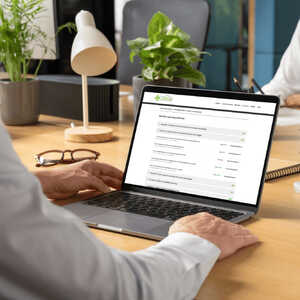
How Compass helps you manage device standards, actions and evidence
Computeam Compass turns the DfE laptop, desktop and tablet standard into a clear framework that technical teams and leaders can work on together. Compass helps you build a structured view of your device estate and how it aligns with expectations.
Make the expectations visible
Compass sets out the key device requirements, enabling schools to record the types of devices in use, operating system versions, management tools, filtering and monitoring coverage, accessibility considerations and disposal processes. This creates a single overview that SLT, IT staff, DPOs and governors can understand without needing to review multiple separate documents.
Assign ownership and track actions
When gaps are identified – such as unsupported operating systems, unmanaged devices, missing asset records or unclear disposal processes – Compass allows you to create actions with named owners and target dates. Tasks might include planning a phased refresh, enrolling devices into central management, updating the asset register or reviewing training needs. Progress is visible to the relevant teams, which helps ensure that device-related risks are addressed rather than staying on a to-do list.
Keep a secure, auditable record
Compass provides a secure record of decisions, reviews and evidence relating to devices. You can log summaries of device audits, CPD activities, disposal certificates, accessibility decisions and procurement notes against the device standard. Each entry is time-stamped so you can demonstrate how your approach has evolved and how you are managing risk.
Give MAT leaders a trust-wide view
For multi-academy trusts, Compass brings together device information from multiple schools. Central teams can see which schools meet agreed device standards, where unmanaged or unsupported devices remain and how training and asset management practices vary. This insight supports trust-wide planning, joint procurement and targeted support for schools that need it most.
Your next steps
If you are reviewing your laptops, desktops and tablets against the DfE digital and technology standard, Computeam Compass can provide structure and shared visibility. It helps you capture what is in place now, identify where devices and management processes need attention and record the actions you are taking to improve security, reliability and value for money.

See how Compass tracks the laptop, desktop and tablet standard alongside the wider DfE digital and technology framework.

Explore Compass with your team and begin building a live picture of your school or trust’s digital and technology standards.
Get in touch
See where you stand - and what to do next
Computeam Compass is now available for Computeam clients – and can be explored by any other MAT or School looking to adopt a clearer, more strategic approach to digital compliance.
Share a few details and we’ll send you a demo login and the quickest way to get started. You’ll get a clear view of where you stand, what to prioritise, and who needs to own each action.
 Updating page...