
Make digital accessibility practical, consistent and easy to evidence
Digital accessibility often ends up handled case by case – making it difficult to be consistent across platforms, staff teams and year groups. It also makes it harder to evidence what has been considered in procurement, how staff have been supported, and how decisions have been reviewed over time.
Computeam Compass gives you a structured way to understand how your accessibility arrangements compare to the DfE digital and technology standard, assign actions across SLT, SENDCo, IT and business teams, and keep a clear record of decisions, consultations, training and improvements.
Only 7% of primary teachers have had training on using accessibility features built into mainstream devices and software.
Source: Technology in schools survey: 2024 to 2025 – Research report (Department for Education, carried out by IFF Research, published Nov 2025)
What you need to put in place for accessible digital learning
The DfE digital accessibility standard sets out how schools and colleges should build accessibility into their digital environment. It focuses on policies and strategy, procurement, day-to-day use of technology and staff training.
The guidance expects schools to think about the needs of different users, including pupils with special educational needs and disabilities, staff with additional requirements and parents or carers who access information from home. It links digital accessibility to existing duties under equality and SEND legislation and to wider school policies.
At a glance, this digital and technology standard covers:

Embedding accessibility in key policies such as the digital strategy, curriculum and SEND plans
Considering accessibility whenever new digital systems, content or devices are procured or designed
Ensuring platforms, websites and resources can be used by people with a range of needs
Making use of built-in accessibility features and assistive technologies
Providing staff with training and guidance so they can support pupils effectively
Make digital access work for pupils, staff and families
All pupils should be able to access learning resources, homework platforms and communication tools in ways that work for them. Staff need systems that support their own needs so they can focus on teaching and support, rather than fighting with tools that are difficult to use. When accessibility is overlooked, pupils can be excluded from learning opportunities or have to rely on ad hoc fixes that are hard to sustain.
There is also a legal and reputational dimension. Schools and trusts are required to make reasonable adjustments and to think ahead about how disabled users will access services. This applies as much to digital systems as it does to physical spaces. Websites, learning platforms and communications that are difficult to use or understand can place schools at risk of complaints and damage relationships with families.
Good accessibility planning supports better use of technology overall. When staff understand how to use features such as captions, display settings, text-to-speech or translation tools, they can apply them flexibly to support a wide range of learners. For multi-academy trusts, a consistent approach to digital accessibility helps ensure that pupils receive a similar level of support across different schools and that staff have common expectations.
Bring accessibility actions and evidence into one clear view
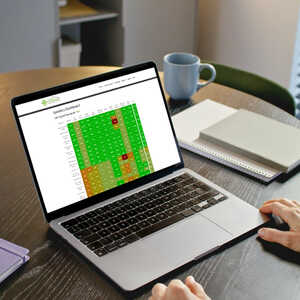
Computeam Compass turns the DfE digital accessibility standard into a clear framework that leaders, SEND teams and technical staff can work on together. It helps create a structured and all-encompassing view of how accessibility is addressed across your digital estate.
Make the expectations visible
Schools can record where accessibility is reflected in policies, how user needs have been assessed, which systems are in scope and what specific accessibility features or tools are available. This creates a shared overview that SLT, SENDCo, IT staff and governors can understand without needing to search through multiple documents.
Assign ownership and track actions
When gaps are identified – such as missing policy references, limited staff training or unclear supplier information – Compass allows you to create actions with named owners and realistic deadlines. Tasks might include reviewing the accessibility of a key platform, adding accessibility considerations to procurement templates or planning staff training sessions. Progress is visible to the relevant teams, which helps keep accessibility improvements moving alongside other priorities.
Keep a secure, auditable record
Compass provides a secure place to store evidence and decisions related to digital accessibility. You can log consultation notes, policy updates, training records, supplier statements and review outcomes against the accessibility standard. Each entry is time-stamped so you can show how your approach has developed and how you respond to changing needs.
Give MAT leaders a trust-wide view
For multi-academy trusts, Compass brings together accessibility information from multiple schools. Central teams can see where accessibility is well embedded, where policy or training gaps exist and how different platforms are used. This supports trust-wide planning, shared training and more consistent expectations for inclusion across the organisation.
Your next steps
If you are reviewing your digital accessibility arrangements against the DfE digital and technology standard, Computeam Compass can provide structure and shared visibility. It helps you capture what is in place now, identify where policies, systems or training need attention and record the actions you are taking to make digital provision more inclusive.

See how Compass tracks the broadband standard and the wider DfE Digital and Technology Standards framework.

Explore Compass with your team and begin building a live picture of your school or trust’s digital and technology standards.
Get in touch
See where you stand - and what to do next
Computeam Compass is now available for Computeam clients – and can be explored by any other MAT or School looking to adopt a clearer, more strategic approach to digital compliance.
Share a few details and we’ll send you a demo login and the quickest way to get started. You’ll get a clear view of where you stand, what to prioritise, and who needs to own each action.
 Updating page...